Drafting at the speed of AI.
Turn a PDF set into a working CAD file. Make one change across every sheet. Turn a plan check letter into clouded revisions and a client ready summary.
Built by a licensed general contractor with an engineering background, for teams with deadlines.
What it does
Hours of drafting and redlines, done in minutes. You review every change before it is applied.
PDF to CAD in minutes
Upload a CAD PDF set and get a working DXF or DWG back, sheet by sheet, at true scale. Lines, text, leaders and line weights come across, and each page lands on its own sheet.
One change, every sheet
Type the change once, like a new owner name or a revised dimension. The software finds every place it appears on every sheet and lists each edit for you to approve.
Plan check letters, handled
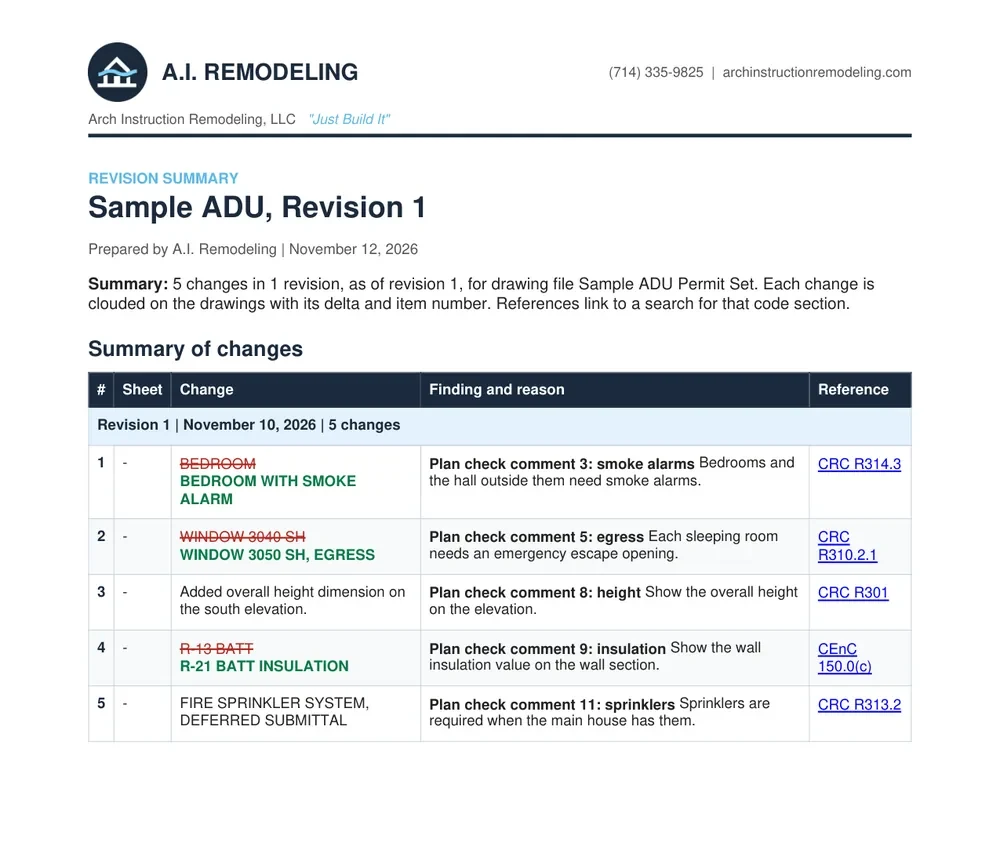
Attach the correction letter, even a scanned one. Each comment becomes a proposed fix with the finding, the reason and the code section it cites.
Checks against your specs
Upload the specs, standards and code sections you work to. The review flags what does not match and suggests the fix.
Revision clouds and a client summary
Every accepted change gets a revision cloud and delta tag. Export a branded summary table in PDF or Word to send with the resubmittal.
Works with AutoCAD
Download DWG or DXF and keep working in AutoCAD. Layers, sheets and viewports stay organized the way a drafter expects.
How it works
Upload
Drop in a PDF set, DWG or DXF. Add your title block, specs and the plan check letter.
Tell it what to change
Circle an area and type the change, or give one instruction for the whole set. Review every edit before it is applied.
Export and send
Download the clouded PDF set, the DWG and the revision summary. A licensed contractor reviews the work before it goes out.
Two ways to work with us
Run it yourself, or hand us the scope.
Your team, our software
Get an account and run it yourself. Your drafters move faster, and your deadlines stop waiting on the backlog.
- PDF to CAD conversion
- Every sheet changes and plan check reviews
- Revision clouds and client summaries
- Onboarding and support
Our team, your deadline
Send us the scope. We draft and design it, sit in on your design reviews, and revise until the set is ready to issue for construction.
- Drafting and design from your scope
- Design review meetings with your team
- Fast turnaround on revisions
- Reviewed by a licensed contractor
Arch Instruction Remodeling, LLC · CSLB #1151239 · MBE · SDB Qualified
Questions
No. It drafts and revises fast. Your licensed professional of record still reviews and stamps the set.
Book a demo
Bring a real set. We will convert it, run a revision on it live, and show you the summary your client would get.
(714) 335-9825architectsinstruction@gmail.com